How to use all Cores of CPU or Slow compilation with Intel in UE4
STEP 1
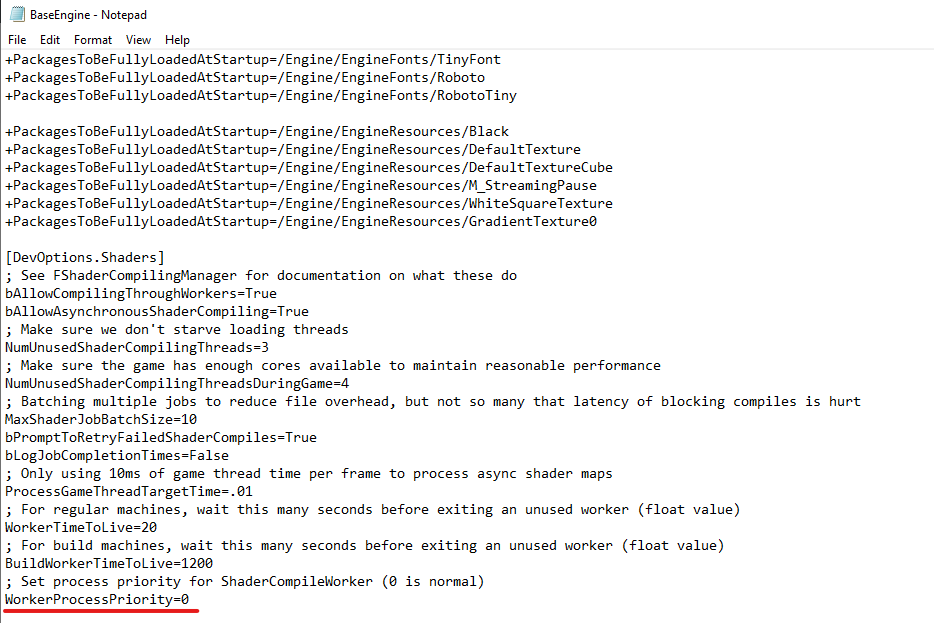
Edit BaseEngine.ini and set WorkerProcessPriority from 1 to 0
/Engine/Config/BaseEngine.ini
——–
FROM
; Set process priority for ShaderCompileWorker (0 is normal)
WorkerProcessPriority=-1
TO
; Set process priority for ShaderCompileWorker (0 is normal)
WorkerProcessPriority=0
——–
Edit ParallelExecutor.cs
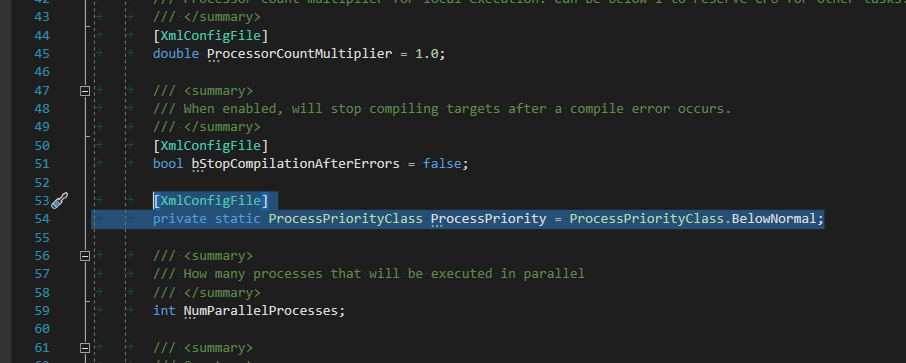
In ..\Engine\Source\Programs\UnrealBuildTool\Executors\ParallelExecutor.cs
AFTER:
[XmlConfigFile]
bool bStopCompilationAfterErrors = false;
ADD:
[XmlConfigFile]
private static ProcessPriorityClass ProcessPriority = ProcessPriorityClass.BelowNormal;
AND REPLACE:
using (ManagedProcess Process = new ManagedProcess(ProcessGroup, Action.Inner.CommandPath.FullName, Action.Inner.CommandArguments, Action.Inner.WorkingDirectory.FullName, null, null, ProcessPriorityClass.BelowNormal))
WITH:
using (ManagedProcess Process = new ManagedProcess(ProcessGroup, Action.Inner.CommandPath.FullName, Action.Inner.CommandArguments, Action.Inner.WorkingDirectory.FullName, null, null, ProcessPriority))

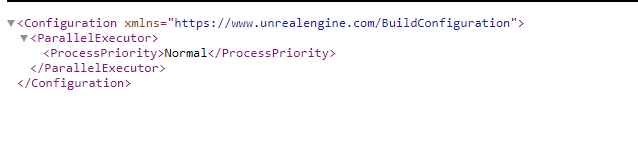
Then go to Engine\Saved\UnrealBuildTool\BuildConfiguration.xml or C:\Users\
EDIT FILE AND PAST CODE FROM IMAGE
After this small changes all CPU cores will use for compilation of your projects